Why Trust AllQbanks? We help thousands of IMGs and Canadian medical students prepare for the MCCQE every year. Our study guides are verified against official MCC objectives and informed by proprietary performance data from our 5,200+ question testing platform. Read our Editorial Policy.
The AllQbanks Exam Builder lets you create custom MCCQE Part 1 practice sessions — filtered by subject, module, keyword, or previous mistakes — so you drill exactly what you need instead of doing random blocks and hoping for the best.
How the Advanced Exam Builder Works
Think of it as designing your own custom MCCQE Part 1 exam, tailored precisely to your learning needs at any given moment.
1. Precise Subject Selection
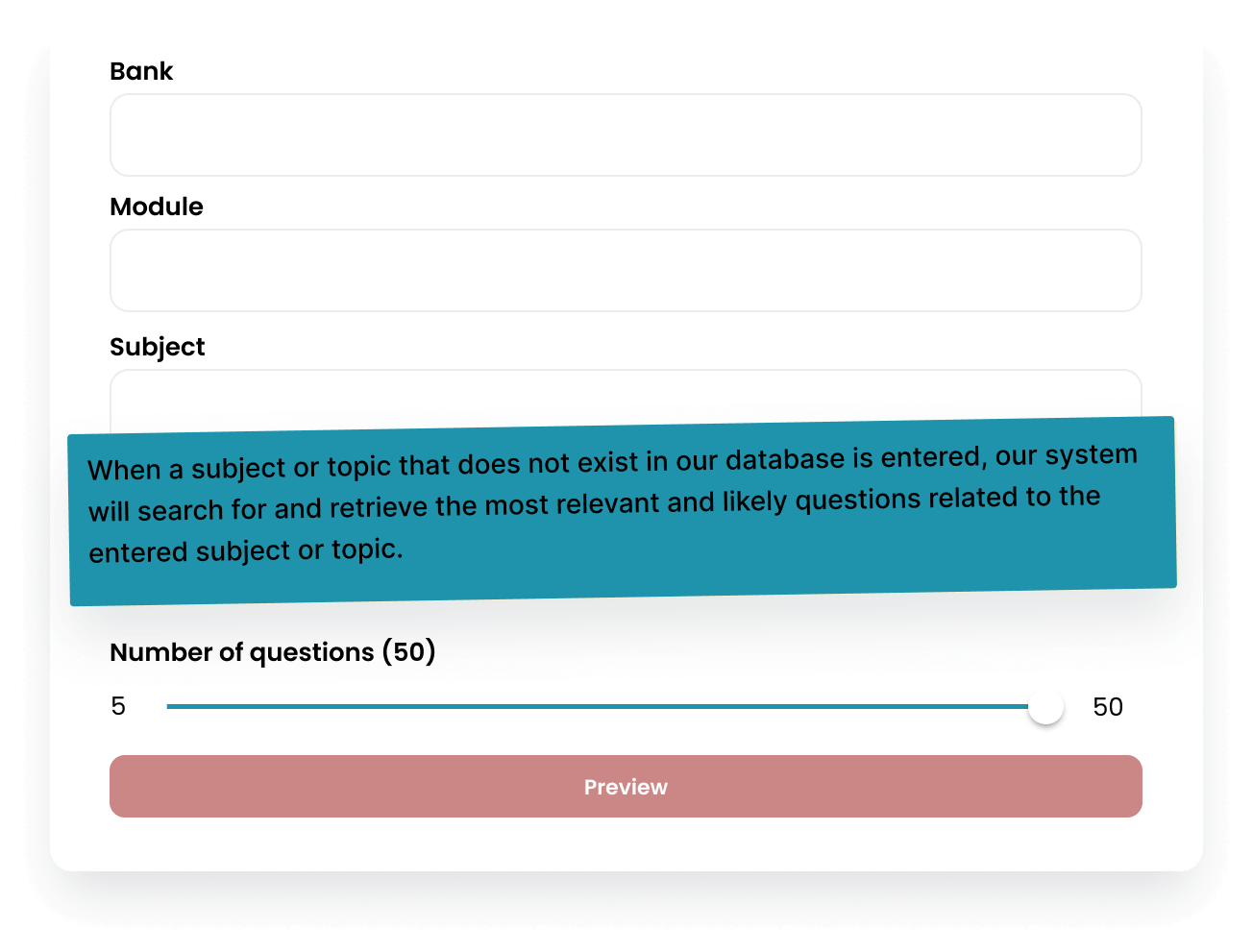
The foundation is choosing what you want to practice. But we didn't just give you broad categories like "Medicine" or "Surgery."
You get the complete curriculum broken down into:
- Major Subjects: Medicine, Surgery, Pediatrics, Psychiatry, Obstetrics & Gynecology, etc.
- Specialized Areas: Ethics & Professionalism, Preventive Medicine, Emergency Medicine
- Systems-Based: Cardiovascular, Respiratory, Endocrine, Renal, etc.
Real-world usage: You just finished a weak performance on your practice exam simulation, and the analytics showed you scored only 55% on Psychiatry questions. Instead of doing another random block hoping for more Psychiatry exposure, you simply select "Psychiatry" and create a dedicated session.
Or maybe you're three weeks from test day and you want to focus exclusively on high-yield emergency presentations. Select Emergency Medicine, Cardiovascular Emergencies, and Trauma—build exactly the practice you need.
2. Granular Module and Sub-Module Filtering
But we went deeper. Medical knowledge isn't organized by subject alone—it's hierarchical.
Within each major subject, you can drill down into:
- Modules: Specific organ systems or disease categories
- Sub-modules: Individual conditions or clinical scenarios
Example hierarchy:
- Medicine → Endocrinology → Thyroid Disorders
- Surgery → Acute Abdomen → Appendicitis
- Pediatrics → Growth & Development → Failure to Thrive
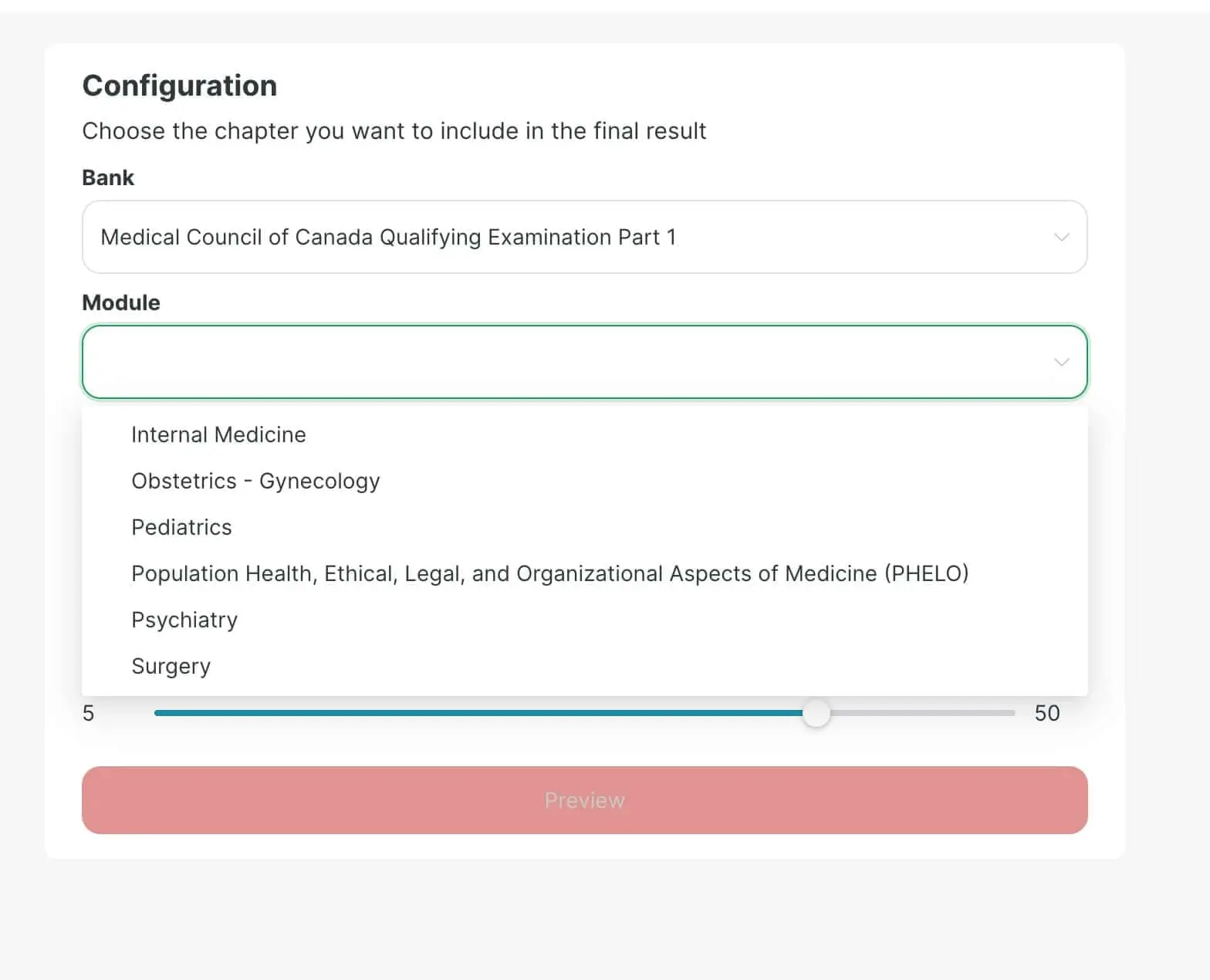
Let's say you bombed a question about hypothyroidism management. Don't just select "Endocrinology" and hope you see another thyroid question. Expand Medicine → Endocrinology → check the "Thyroid Disorders" sub-module.
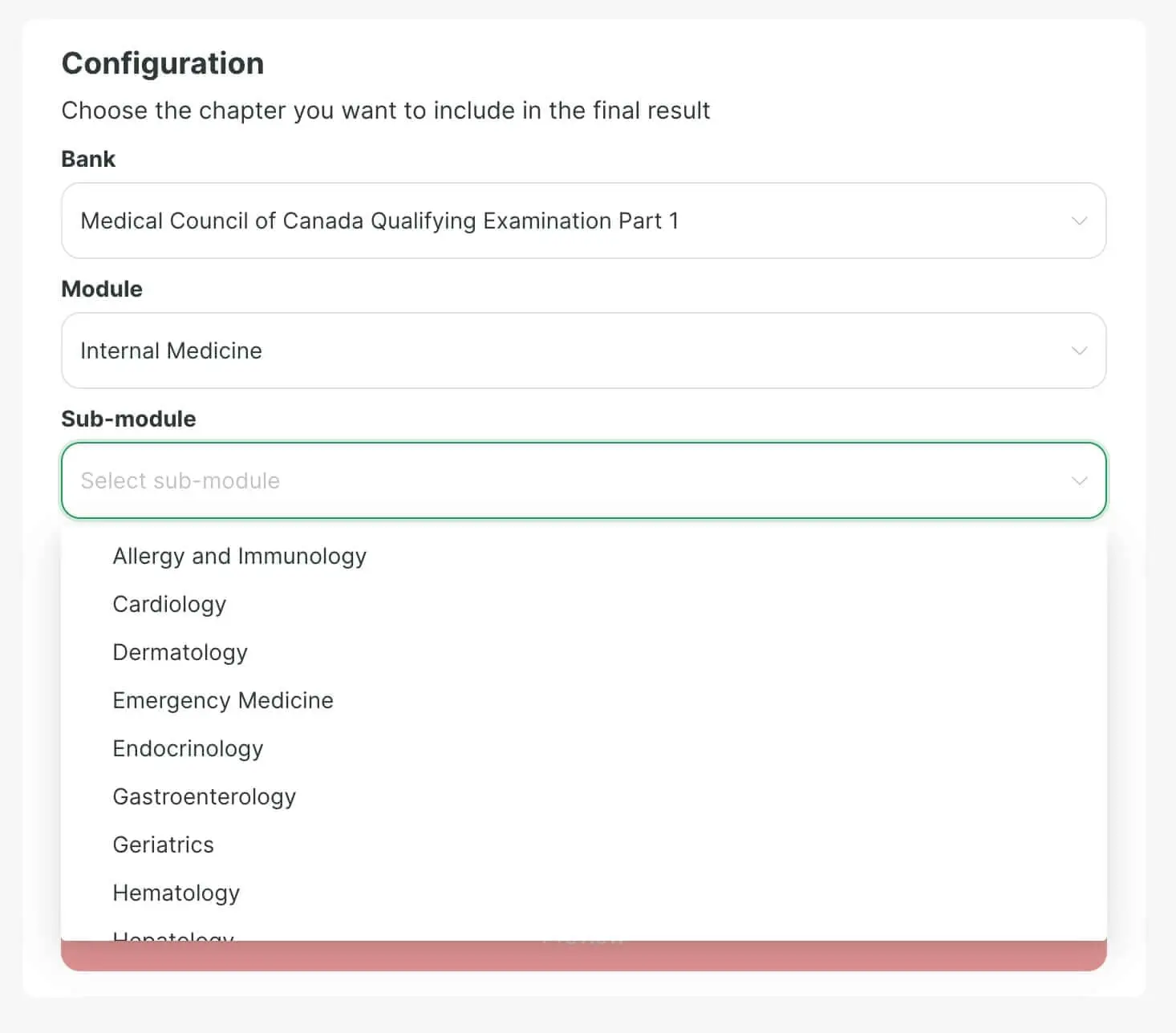
This is the difference between studying and strategic remediation. You're not leaving your weak areas to chance—you're directly addressing them with concentrated practice.
3. Keyword-Based Question Targeting
Sometimes you don't need an entire subject. You need to practice one specific condition or concept that keeps appearing in questions you miss.
The keyword search function lets you type in exactly what you want to practice:
- "Kawasaki disease"
- "Aortic stenosis"
- "Preeclampsia management"
- "Informed consent"
- "Child abuse reporting"
The builder instantly scans the entire question database (thousands of questions) and isolates every question containing that keyword or related concept.
Why this matters: Maybe you reviewed glomerulonephritis in your textbook, but reading about it isn't the same as answering clinical vignettes about it. Keyword targeting gives you immediate practice applying that knowledge in exam-style scenarios.
This is particularly powerful for:
- Rare presentations you need to recognize (e.g., Whipple's disease, Waterhouse-Friderichsen syndrome)
- Ethical scenarios around specific issues (consent, confidentiality, end-of-life)
- Pharmacology for specific drug classes you confuse
- Diagnostic imaging interpretation for specific conditions
4. Building from Previous Mistakes
Here's one of the most powerful features: creating exams based on questions you previously answered incorrectly.
After you complete practice sessions, our system tracks every question you missed. The Exam Builder can:
- Show you only previously incorrect questions (for review)
- Create new questions on the same topics as your mistakes
- Mix incorrect questions with related new questions for spaced repetition
The learning science behind this: Research consistently shows that practicing questions you previously missed is one of the most effective study techniques. It forces you to confront weaknesses head-on and build stronger neural pathways for correct reasoning.
Most students avoid this. They'd rather do new questions (even on topics they've mastered) than face their failures again. That's ego protection, not effective studying.
The Exam Builder makes it easy to do the hard thing: create a "redemption exam" of nothing but your recent mistakes.
5. Live Preview and Question Count
As you select subjects, modules, and keywords, a live preview shows you exactly how many questions match your criteria.
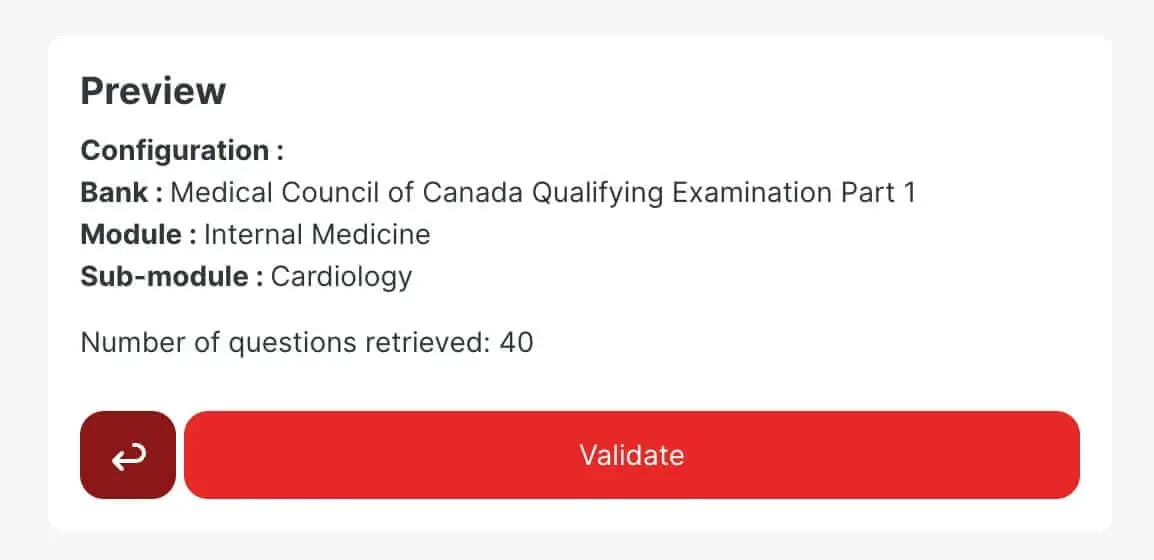
This prevents the frustration of building a session only to discover there are only 3 questions available. If you select a very specific sub-module and the preview shows 8 questions, you know that's what you're getting.
It also helps you adjust your filters to create sessions of ideal length:
- Short drills: 10-20 questions on a single concept
- Standard sessions: 30-50 questions on a topic area
- Full simulation: 115 questions mimicking half of the actual MCCQE Part 1 2026 format
Choosing Your Learning Mode
Once you've built your custom question set, you need to decide how to take it. This choice dramatically affects what you learn.
Instant Correction Mode (Active Learning)
Best for: Learning new material, understanding concepts, and building foundational knowledge
How it works:
- Answer a question
- Immediately see the correct answer and detailed explanation
- Understand your reasoning error in real-time
- Move to the next question with the lesson fresh in mind
Why it matters: Immediate feedback prevents you from reinforcing incorrect reasoning. If you answer a question wrong and then answer 49 more questions before seeing why you were wrong, you've lost the teachable moment.
This mode is ideal when you're:
- First encountering a topic
- Struggling with a concept and need immediate clarification
- Using the builder to actively learn, not just test yourself
- Reviewing previously incorrect questions to understand your mistakes
The explanations don't just tell you the right answer—they explain why the other options are wrong, which is crucial for understanding the exam's distractor logic.
Delayed Correction Mode (Exam Simulation)
Best for: Testing your knowledge, building exam stamina, and simulating real test conditions
How it works:
- Timer starts (you set the duration)
- Answer all questions in the set
- No feedback until you finish
- Review all answers and explanations together at the end
Why it matters: This replicates the actual MCCQE Part 1 experience. You need to make decisions without immediate validation, manage your time, and maintain focus across multiple questions.
Use this mode when you're:
- Testing whether you've truly mastered a topic
- Building mental endurance for long question sets
- Simulating actual exam conditions
- Later in your preparation timeline (closer to test day)
The psychological experience of uncertainty—not knowing if you got the last question right while moving to the next one—is itself a skill that needs practice.
Strategic Use Cases: Getting the Most from the Builder
Now that you understand the mechanics, here's how to actually use the Exam Builder strategically throughout your preparation.
Early Preparation Phase (Months 1-2)
Strategy: Subject-by-subject mastery with instant feedback
Build 30-40 question blocks on individual subjects in Instant Correction Mode:
- Day 1: Pure Cardiology
- Day 2: Pure Respiratory
- Day 3: Pure Endocrinology
Track your scores by subject to identify broad weak areas. This creates your roadmap for where to focus deeper study.
Mid-Preparation Phase (Months 3-4)
Strategy: Module-level drilling on identified weaknesses
Based on your early performance data, you now know which specific areas need work. Use the module and sub-module filters to create targeted sessions:
- Struggled with Nephrology? Do 50 questions drilling Renal system
- Ethics questions killing you? Create a pure Ethics & Professionalism block
- Pediatric development confusing? Target Growth & Development sub-module
Alternate between Instant and Delayed modes depending on whether you're learning or testing.
Late Preparation Phase (Final 4-6 Weeks)
Strategy: Mixed simulations + targeted weakness remediation
Create full-length simulations (115 questions, timed) in Delayed Correction Mode to build stamina.
Between simulations, use the Builder to create short, targeted drills on any topics where simulation performance was weak:
- Bombed the Obstetrics questions in your last sim? Create a 25-question OB drill
- Noticed you're making careless mistakes on Ethics? Do 15 ethics questions with instant feedback to recalibrate your reasoning
The Day Before the Exam
Strategy: Confidence-building review
This is NOT the time for brutal weakness drilling. Create a mixed 30-question block covering your strongest topics in Instant Correction Mode.
The goal: end your preparation feeling confident and sharp, not demoralized by difficult questions on your weakest areas.
Combining the Builder with Other Platform Features
The Exam Builder doesn't exist in isolation. It's most powerful when integrated with other AllQbanks features.
After Taking Practice Exams
Every time you complete a full exam simulation, you get detailed analytics showing performance by subject, system, and topic.
Use those analytics to inform your next Builder session:
- Analytics show 45% correct on Surgery questions? Build a Surgery-heavy practice set
- Performance dropped in the second half of the simulation? Create a stamina-building 115-question marathon
- Specific disease categories flagged as weak? Target those exact sub-modules
With the AI Tutor Feature
When you're reviewing questions in the Builder and encounter an explanation you don't fully understand, use the AI tutor to ask follow-up questions:
- "Why is metformin contraindicated in this scenario?"
- "Explain the mechanism behind this treatment choice"
- "What are the key differences between these two conditions?"
Immediate, personalized clarification accelerates learning far beyond passive reading.
With Community Discussions
Stuck on why a particular answer is correct, even after reading the explanation? Use the discussion feature to see how other students reasoned through the same question, or ask the community for different perspectives.
Sometimes hearing how a peer explains a concept clicks better than the formal explanation.
Common Mistakes to Avoid
Smart students make predictable errors with the Exam Builder. Don't be one of them.
Mistake #1: Only Practicing Comfortable Topics
The Builder makes it easy to create sessions on topics you enjoy or already understand. Don't. Use it to confront what you've been avoiding.
If you never build Psychiatry sessions because "you'll get to it eventually," test day will punish that avoidance.
Mistake #2: Making Sessions Too Specific Too Early
Early in preparation, drilling down to individual sub-modules (like Primary Hyperparathyroidism) is premature. You need broad exposure first.
Reserve hyper-specific targeting for identified weaknesses after you have baseline knowledge.
Mistake #3: Always Using Instant Correction Mode
Instant feedback feels better—you learn the answer right away. But if you never practice in Delayed Correction Mode, you're not training for actual exam conditions.
Build tolerance for uncertainty. Practice making decisions without immediate validation.
Mistake #4: Ignoring the Question Count Preview
Creating a session with only 5 available questions wastes time and breaks your study flow. Always check the live preview and adjust filters to get meaningful session sizes.
Mistake #5: Not Building from Previous Mistakes
This feature exists for a reason: reviewing incorrect questions is proven effective. If you're not regularly creating "incorrect question" review sessions, you're leaving easy gains on the table.
Related Posts
![MCCQE vs USMLE: 7 Key Differences That Change Your Study Plan [2026]: feature image](/img/mccqe-vs-usmle.webp) mccqe
mccqeMCCQE vs USMLE: 7 Key Differences That Change Your Study Plan [2026]
MCCQE Part 1 and USMLE Step 2 CK share about 65% of content. The other 35% will trip you up. Side-by-side comparison of format, scoring, and content —.
Dr. Leila Haddad •
Feb 18, 2026
![Mental Dental Review: How to Use Dr. Ryan's Video Series for the INBDE [2026]: feature image](/img/mental-dental-inbde-review.png) inbde
inbdeMental Dental Review: How to Use Dr. Ryan's Video Series for the INBDE [2026]
Review of Mental Dental by Dr. Ryan for INBDE prep: 56+ video playlists, subject breakdowns, Patreon study guides, and how to combine it with question banks.
AllQbanks Team •
Aug 18, 2026